Showing posts with label software. Show all posts

16 June 2013

Flutter : Play and pause your media with a gesture


Flutter is a small app that uses your webcam to let you pause or start your music playback with a hand gesture. Simply install Flutter, open your music player and listen to some music - to pause playback, just hold up the palm of your hand toward your webcam for a second and the music will stop. To continue listening, simply us the same gesture again, and Flutter will resume playback. A similar gesture is supported for skipping to the next or previous track.

Flutter works best if you gesture within a 1-6 feet distance from your webcam. If you get too close or are too far away it may have difficulties recognizing the gesture. Flutter runs in the system tray and will automatically activate your webcam when you launch your media player.

Currently supports Windows Media Player, iTunes, Spotify and WinAmp.

Download Flutter from here.

02 February 2013

Connectify Dispatch megres internet connections to make your browsing experience faster


 Connectify Dispatch allows us to use our normal home ethernet broadband internet connections and combine it with 3G/4G mobile data connections to get a fastest internet experience. Connectify Dispatch intelligently balances internet traffic and accelerate internet speed. You can experience the increased speed when downloading multiple files, using uTorrent or opening multiple web pages at once. It will make the internet more reliable, if one connection fails accidently, it can automatically switch to another connection.


Connectify Dispatch comes with Connectify Hotspot feature (mentioned in an earlier post) which lets you create Wi-Fi hotspot and share the combined internet connections to any Wi-Fi equipped devices. The service isn't cheap: Connectify Dispatch and 1 year of Connectify Hotspot will set you back $50, while Connectify Dispatch and a lifetime subscription to Connectify Hotspot will cost you $70. Connectify Dispatch isn't available on its own, unfortunately.


Download Connectify Dispatch from here.

05 December 2012

Connectify: Share any internet connection easily


Connectify is an easy to use software router for Windows computers that utilizes your PC's built in Wi-Fi card to wirelessly share any available Internet connection with friends, co-workers, and mobile devices.

Connectify can easily act as your primary router or even a repeater for your home router, extending its range and providing Internet access wherever you need it. Connect to your home network, enter the same Wi-Fi name and password, and hit "Start Hotspot." Devices will automatically connect to the Internet through either your Connectify hotspot or home router depending on proximity.


Before you know it you can finally have Internet access in that impossible back room or basement. In addition, if you run Connectify away from home with these settings, any devices that need to be bound to a specific network (such as Eye-Fi cards or wireless printers) will work flawlessly with no additional configuration no matter where you are! So forget trying to mess around on the command line with ICS, Virtual Wi-Fi, or Hosted Network, just install Connectify and have a real hotspot up and running in seconds.

Features:
  • Software Access Point
    Transform your laptop into a real Wi-Fi hotspot, sharing any available Internet connection.
  • Share Internet from other Wi-Fi Networks
    Re-broadcast the Wi-Fi network you're on, as your own secure Connectify Hotspot using your laptop's Wi-Fi card.
  • Display Connected Computers/Devices
    Know who and what devices are connected to your Connectify Hotspot at all times.
  • Simple Firewall Controls
    Set Internet and local network (LAN) access permissions for each connected device.
Download Connectify from here.

13 March 2011

Japan Earthquake and Tsunami in Google Earth

With Google Earth you can view some really amazing information relating to the 2011 Sendai earthquake and tsunami. The earthquake measured 9.0 on the richter scale and triggered tsumanis and after-shocks that affected countries as far as Canada and the United States. You will need Google Earth and the Real-time Earthquakes KMZ file to view extensive real-time updates on earthquakes not only in Japan but around the world.


Download Google Earth from here.

Download Real-time Earthquakes KMZ file from here.

Also useful is the Real-Time Day and Night Earth KMZ file which can be downloaded here.

03 October 2010

System Ninja: Companion to CCleaner

System Ninja is a program for cleaning your computer of unwanted junk that constantly slows your entire system down. System Ninja features a fast and powerful file cleaner, Startup Manager, Process Manager and Startup Log Generator, plus several useful tools such as CCEnhancer, FileAnalyzr and MalRunDestroyer.


Download System Ninja here.

FileToFolder: Easily create folders for files

FileToFolder is simple to use and focused in it's purpose: make folders from a selection of files and move those files into their respective folders. This is most easily accomplished from the Context Menu in Windows Explorer where FileToFolder is registered but the full application can be launched and operated as a conventional application as well.


Download FileToFolder here.

AntiFreeze: Recover from PC Hang-ups

AntiFreeze offers a last recourse when you find your computer in a hung state. Because programs consume too much CPU or too much memory or too many programs have been started, your computer has become unresponsive. The mouse still moves but no programs are responding, you cannot switch to other programs or even close them. You have even tried to start the Windows Task Manager even that won?t work because it does not get enough attention from the scheduler to respond to your mouse clicks and keyboard presses. You are ready to press the reset button, instead you can press the hotkey of AntiFreeze. It will put to sleep all running programs except the most critical ones, giving you the opportunity to close down the programs which are causing problems. You may even be able to save or recover your work.


Download AntiFreeze here.

11 September 2010

CCEnhancer: Enhance CCleaner to support hundreds of additional programs

CCEnhancer is a small tool which adds support for over 270 new programs into the popular program CCleaner. The tool uses the WinApp2.ini system built into CCleaner to easily add new rules and definitions for programs.

CCEnhancer

CCleaner

Download CCEnhancer here.

28 August 2010

Reorder taskbar tabs with Taskix

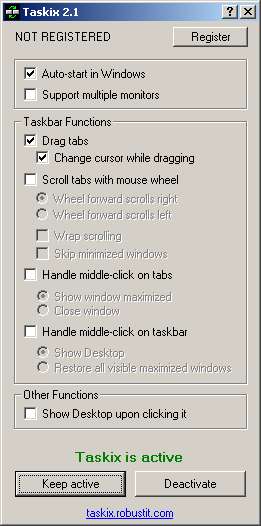
Taskix is a free utility destined for those who keep many open windows at the same time. It allows you to reorder taskbar tabs with drag-and-drop, scroll through tabs with the mouse wheel, or close tabs with middle-click, supports UltraMon taskbars, can Show Desktop and maximize/restore windows. It is small, straightforward to use, fast and uses very few system resources.

Taskix

Download Taskix here.

Type securely with KeyScrambler

KeyScrambler is a free plug-in for your Web browser that protects everything you type from keyloggers. It defeats keyloggers by encrypting your keystrokes at the keyboard driver level, deep within the operating system. When the encrypted keystrokes reach your browser, KeyScrambler then decrypts them so you see exactly the keys you've typed. Keyloggers can only record the encrypted keys, which are completely indecipherable. Unlike anti-virus and anti-spyware programs that depend on recognition to remove keyloggers that they know about, KeyScrambler will protect you from both known and unknown keyloggers. What's more, KeyScrambler provides protection without getting in your way. You don't have anything to learn about the program and you don't have to do anything differently, but with KeyScrambler your important personal information will be a whole lot safer.

Download KeyScrambler here.

Make any program's progress bar less boring with Instant Elevator Music

Instant Elevator Music is a program that plays elevator music or music of your choice while you wait for programs to open, files to copy, and downloads to finish. This program works with practically any program that has a progress bar.

Download Instant Elevator Music here.

21 August 2010

Spoon Browser Sandbox: Perfect Cross-Browser Testing

Spoon Browser Sandbox allows you to run any browser right from your own browser. It requires the download of a plugin and works through virtualization to bring you popular browsers like Microsoft Internet Explorer, Mozilla Firefox, Google Chrome, Apple Safari and Opera.

Spoon Browser Sandbox

The browsers offered are:

Microsoft Internet Explorer
Internet Explorer 6
Internet Explorer 7
Internet Explorer 8
Internet Explorer 9 Preview

Mozilla Firefox
Firefox 2
Firefox 3
Firefox 3.5
Firefox 3.6
Firefox 4 Beta

Google Chrome
Google Chrome
Google Chrome 5
Google Chrome 6 Beta

Apple Safari
Safari 3
Safari 4
Safari 5

Opera
Opera 9
Opera 10

Download Spoon Browser Sandbox here.

Note: Spoon also allows you to run application such as Office Suites, Media Editors etc. available in it's database. Visit their Apps page here.

17 July 2010

Toggle Flash: Easily toggle flash in Internet Explorer

Toggle Flash is a free add-on which can easily toggle flash on a page in Internet Explorer. When installed, a toolbar button is added to the Internet Explorer toolbar. A single click turns off Flash functionality in the background and vice versa.

Toggle Flash

Note: This is an Internet Explorer 7 only addon.

Download Toggle Flash here.

Shell Tools: Add extra useful functionality to the context-menu

Shell Tools is a collection of free Unicode-aware Windows shell extensions and utilities. The package contains the following shell extensions:

  • FontLoader - Adds Load/Unload/Install/Uninstall commands to context menu of font files (TrueType, OpenType and TrueType Collections supported). Windows Vista UAC is supported.


  • FileNote - A program to add comments to files by creating text file that has the same name as selected file and opening it for editing in text editor (Notepad or another). If such text file already exists, it will be opened for editing.


  • RegisterEx - Adds Register Server and Unregister Server commands to context menu of DLL, OCX and EXE files that export DllLoadLibrary and DllUnloadLibrary functions, to easily register/unregister COM servers with ease, by right-clicking. Windows Vista UAC is supported.


  • CopyURL - A program to copy different information from one or more selected favorites items (internet shortcuts) to the clipboard. The commands to copy strings can be fully customized.


  • Apart from the above, Copy Filename, Show Hidden Files and Show File Extensions, Fresh Icons, Fresh Icons are also included in the package.

    Download Shell Tools here.

    Minimize Apps to the System Tray with Trayconizer

    Trayconizer can minimize virtually any application to the system tray rather than having it take up valuable space on the taskbar. There is also an option for starting an application initially in the minimized state. Additionally, multiple Trayconized applications are handled by a single instance of Trayconizer to avoid wasting system resources. Trayconizer will automatically shut itself down when you close the application you are Trayconizing. There are no DLL's required beyond the base Win32 API libraries and will not store any entries in your registry.

    An earlier post introduced a cool Adobe AIR application - Antenna. The application does not have the option to be minimized to the tray. Using Trayconizer, it's easy to do this.

  • Locate the shortcut(s) for your application, in this case Antenna and right click to get the context menu. Select Properties.


  • In the Properties dialog, click the Shortcut tab.


  • In the Target field, insert the target path for Trayconizer in front of the target path of the application making certain to leave a single space in between the final quote mark of the Trayconizer target path and the beginning quote mark of the application's target path.


  • The Target field should change from

    "C:\Program Files\Antenna\Antenna\Antenna.exe"

    to

    "C:\Documents and Settings\Eric P Pereira\My Documents\My Downloads\Software\Trayconizer\Trayconizer.exe" "C:\Program Files\Antenna\Antenna\Antenna.exe"

    Note: Trayconizer changes the shrotcut icon to it's own icon.

    Note: Replace the paths of Trayconizer and application as per your PC's paths.


  • Trayconizer

    That's it. You're done.

    Download Trayconizer here.

    Note: Read more about Antenna here.

    Antenna: Listen to online radio stations from around the world for free

    Based on the Adobe AIR runtime, Antenna is a free Adobe AIR application that you can download and use to browse stations around the globe that are streaming on the internet. Using a vast list of stations combined with a map interface, one can discover, listen to, and switch between thousands of stations effortlessly. Search is possible by country or genre, or just by clicking on a location on the map. Beyond that there is a history of recently-listened stations and stations can even be rated and cab be returned to easily later.

    antenna

    Download Antenna here.

    Download Adobe AIR here.

    16 July 2010

    DNS Helper: Switch DNS servers easily

    DNS Helper (formerly Google DNS Helper) is a tiny application that takes a backup of your PC's current DNS servers, which can be restored at any time, and helps switching them to any of the preferred DNS servers automatically.

    Download DNS Helper here.

    Note: Read more about Google DNS here.

    01 July 2010

    .NET Framework Setup Verification Tool

    This .NET Framework Setup Verification Tool is designed to automatically perform a set of steps to verify the installation state of one or more versions of the .NET Framework on a computer. It will verify the presence of files, directories, registry keys and values for the .NET Framework. It will also verify that simple applications that use the .NET Framework can be run correctly.

    .NET Framework Setup Verification Tool

    Download the .NET Framework Setup Verification Tool here. Alternately, you can download the .NET Framework Setup Verification Tool here.

    Read the .NET Framework Setup Verification Tool User's Guide here.

    NOTE: Read more about .NET Framework Cleanup Tool here.

    29 June 2010

    .NET Framework Cleanup Tool

    .NET Framework Cleanup Tool is designed to automatically perform a set of steps to remove selected versions of the .NET Framework from a computer. It will remove files, directories, registry keys and values and Windows Installer product registration information for the .NET Framework. The tool is intended primarily to return your system to a known (relatively clean) state in case you are encountering .NET Framework installation, uninstallation, repair or patching errors so that you can try to install again.

    .NET Framework Cleanup Tool

    Download the .NET Framework Cleanup Tool here. Alternately, you can download the .NET Framework Cleanup Tool here.

    Read the .NET Framework Cleanup Tool User's Guide here.

    If you plan to re-install the .NET Framework after running the cleanup tool, you can download the various versions of the .NET Framework from the following locations:

    .NET Framework 1.0

    http://www.microsoft.com/downloads/details.aspx?familyid=d7158dee-a83f-4e21-b05a-009d06457787

    .NET Framework 1.0 SP3

    http://www.microsoft.com/downloads/details.aspx?familyid=6978d761-4a92-4106-a9bc-83e78d4abc5b

    .NET Framework 1.1

    http://www.microsoft.com/downloads/details.aspx?FamilyId=262D25E3-F589-4842-8157-034D1E7CF3A3

    .NET Framework 1.1 SP1

    http://www.microsoft.com/downloads/details.aspx?familyid=a8f5654f-088e-40b2-bbdb-a83353618b38

    .NET Framework 2.0

    http://www.microsoft.com/downloads/details.aspx?FamilyID=0856eacb-4362-4b0d-8edd-aab15c5e04f5

    .NET Framework 2.0 with SP1

    http://www.microsoft.com/downloads/details.aspx?FamilyId=79BC3B77-E02C-4AD3-AACF-A7633F706BA5

    .NET Framework 2.0 with SP2

    http://www.microsoft.com/downloads/details.aspx?FamilyID=5b2c0358-915b-4eb5-9b1d-10e506da9d0f

    .NET Framework 3.0

    http://www.microsoft.com/downloads/details.aspx?FamilyID=10CC340B-F857-4A14-83F5-25634C3BF043

    .NET Framework 3.0 with SP1

    http://www.microsoft.com/downloads/details.aspx?FamilyId=EC2CA85D-B255-4425-9E65-1E88A0BDB72A

    .NET Framework 3.5

    http://www.microsoft.com/downloads/details.aspx?FamilyId=333325FD-AE52-4E35-B531-508D977D32A6

    .NET Framework 3.5 with SP1

    http://www.microsoft.com/downloads/details.aspx?familyid=AB99342F-5D1A-413D-8319-81DA479AB0D7

    .NET Framework 4 Full

    http://www.microsoft.com/downloads/details.aspx?FamilyID=0a391abd-25c1-4fc0-919f-b21f31ab88b7

    .NET Framework 4 Client Profile

    http://www.microsoft.com/downloads/details.aspx?FamilyID=e5ad0459-cbcc-4b4f-97b6-fb17111cf544

    19 June 2010

    Soluto: The Anti-Frustration Software

    Soluto is a unique startup manager that can help you make your PC boot faster by disabling or delaying certain auto-start items. Unlike similar applications that merely list the programs that are set to start automatically whenever your computer starts, Soluto actually analyzes the boot process and shows you exactly which applications are starting on boot and how they influence your overall boot time. Based on community feedback and internal data, Soluto can classify programs into groups that suggest which applications can be safely disabled (No-Brainers), which require some advanced knowledge and which are required by the operating system and cannot be disabled. Whenever available, Soluto provides detailed information for each program as well as statistics that show what other users did with it. You can choose to disable (pause) a startup program or delay the start until after the boot process is complete. Other features include long-term boot time statistics and optional participation in the community Wiki.

    Soluto

    Download Soluto here.